<?xml version="1.0" encoding="utf-8"?>
<feed xmlns="http://www.w3.org/2005/Atom">
    <id>https://message.style/blog</id>
    <title>Embed Generator | Discord embeds without the hassle Blog</title>
    <updated>2024-01-20T00:00:00.000Z</updated>
    <generator>https://github.com/jpmonette/feed</generator>
    <link rel="alternate" href="https://message.style/blog"/>
    <subtitle>Embed Generator | Discord embeds without the hassle Blog</subtitle>
    <icon>https://message.style/img/logo.svg</icon>
    <entry>
        <title type="html"><![CDATA[The Best Discohook Alternative]]></title>
        <id>https://message.style/blog/discohook-alternative</id>
        <link href="https://message.style/blog/discohook-alternative"/>
        <updated>2024-01-20T00:00:00.000Z</updated>
        <summary type="html"><![CDATA[Discohook is a popular tool for creating Discord embed messages using Webhooks. Sadly it's not perfect ...]]></summary>
        <content type="html"><![CDATA[<p>Discohook is a popular tool for creating Discord embed messages using Webhooks. Sadly it's not perfect ...
For many features an additional bot is needed and the setup can be confusing. Additionally the uptime has been far from perfect recently.</p>
<p>TLDR: <a href="https://message.style/" target="_blank" rel="noopener noreferrer">Embed Generator</a> is the superior alternative to Discohook in terms of features, usability, and stability.</p>
<h2 class="anchor anchorWithStickyNavbar_LWe7" id="overview-of-discohook">Overview of Discohook<a href="https://message.style/blog/discohook-alternative#overview-of-discohook" class="hash-link" aria-label="Direct link to Overview of Discohook" title="Direct link to Overview of Discohook">​</a></h2>
<p>Discohook is an open source service that allows users to create good looking embed messages for their Discord server.</p>
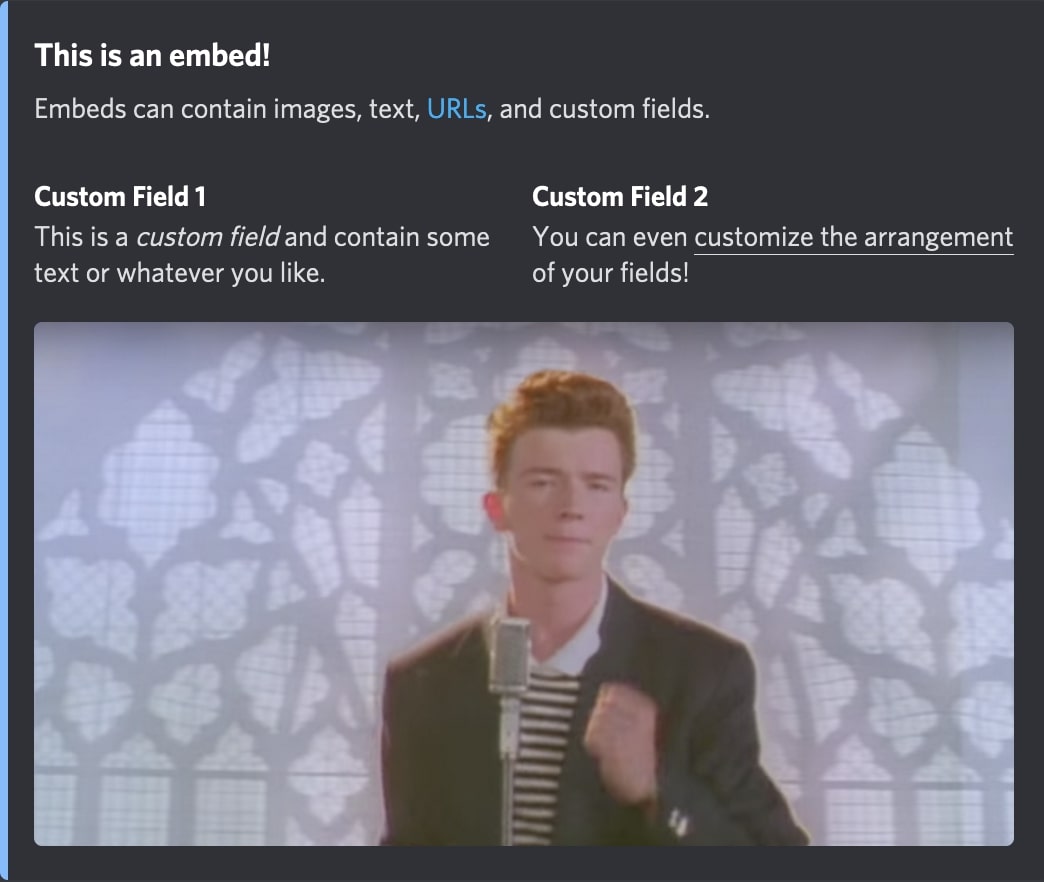
<p>Discord embed messages are commonly used by Discord server owners to make their announcement messages look better and give them a bit more strucutre. Without external tools like Discohook the formatting of messages in Discord is quite limited.</p>
<p>To send these messages Discohook uses so called Webhooks. Discord allows server owner to create Webhooks for their channels which can then be copied into tools Discohook to send a message to that channel. While Webhooks are good for many purposes they are no very beginner friendly and also lack some important features.</p>
<p>Discohook lets users create "backups" of their messages which they can restore at a later point. This way users can work on multiple messages without loosing progress. These message backups are sadly only stored locally and are not synchronized across the devices of the user. Sometimes they are even deleted when the user clears their browser cache.</p>
<p><img decoding="async" loading="lazy" alt="Embed Example" src="https://message.style/assets/images/embed-141de6784211251f947dbe577f67c723.jpg" width="1044" height="882" class="img_ev3q"></p>
<p>While the most basic features of Discohook are easily accessible through their website, for more advanced features like scheduled messages and interactive components you have to leave their website and invite a third party bot or even install a browser extension.</p>
<h2 class="anchor anchorWithStickyNavbar_LWe7" id="the-need-for-a-discohook-alternative">The need for a Discohook alternative<a href="https://message.style/blog/discohook-alternative#the-need-for-a-discohook-alternative" class="hash-link" aria-label="Direct link to The need for a Discohook alternative" title="Direct link to The need for a Discohook alternative">​</a></h2>
<p>Discohook is a great service for creating Discord embed messages and it's understandable that many users like it. It allows designing and structuring Discord messages in a way that isn't possible out of the box with Discord.</p>
<p>Sadly Discohook hasn't seen any active development in the last fear years and is falling behind the competition. It lacks support for newer Discord features and is only really suitable for static messages.</p>
<p>While you can use other third party services to augment the features of Discohook to add support for interactive components and scheduled messages, this isn't user or beginner friendly at all.</p>
<p>In the last few months Discohook has experienced an increasing amount of downtime. Users weren't able to access the website, send messages or access their backups. While this is certainly not a good sign, we understand the difficulties of financing a service purely with donations.</p>
<p>This is why there is a need for a good Discohook alternative that is actively maintained, user friendly, and supports all of the important features out of the box.</p>
<h2 class="anchor anchorWithStickyNavbar_LWe7" id="introducing-embed-generator">Introducing Embed Generator<a href="https://message.style/blog/discohook-alternative#introducing-embed-generator" class="hash-link" aria-label="Direct link to Introducing Embed Generator" title="Direct link to Introducing Embed Generator">​</a></h2>
<p><a href="https://message.style/" target="_blank" rel="noopener noreferrer">Embed Generator</a> is an open source alternative to Discohook. It is actively maintained by a competent team with over 6 years of experience in the Discord space and supports all the important features out of the box.</p>
<p>All of the features like embeds, interactive components, scheduled messages, and custom commands are available through an easy to use web interface and don't require any third party services or complex integrations.</p>
<p>All features of Discohook and even more advanced features like interactive components and scheduled messages are available for free using Embed Generator. While you can subscribe to Embed Generator Premium to get the most out of it and support the development, it's completely optional.</p>
<h3 class="anchor anchorWithStickyNavbar_LWe7" id="visual-engaging-embeds">Visual Engaging Embeds<a href="https://message.style/blog/discohook-alternative#visual-engaging-embeds" class="hash-link" aria-label="Direct link to Visual Engaging Embeds" title="Direct link to Visual Engaging Embeds">​</a></h3>
<p>Embed Generator allows you take advantage of all Discord embed features, including titles, images, custom fields, and even having multiple embeds per message. In additional to embeds you can add file attachments and interactive componenets.</p>
<h3 class="anchor anchorWithStickyNavbar_LWe7" id="user-friendly-interface">User-Friendly Interface<a href="https://message.style/blog/discohook-alternative#user-friendly-interface" class="hash-link" aria-label="Direct link to User-Friendly Interface" title="Direct link to User-Friendly Interface">​</a></h3>
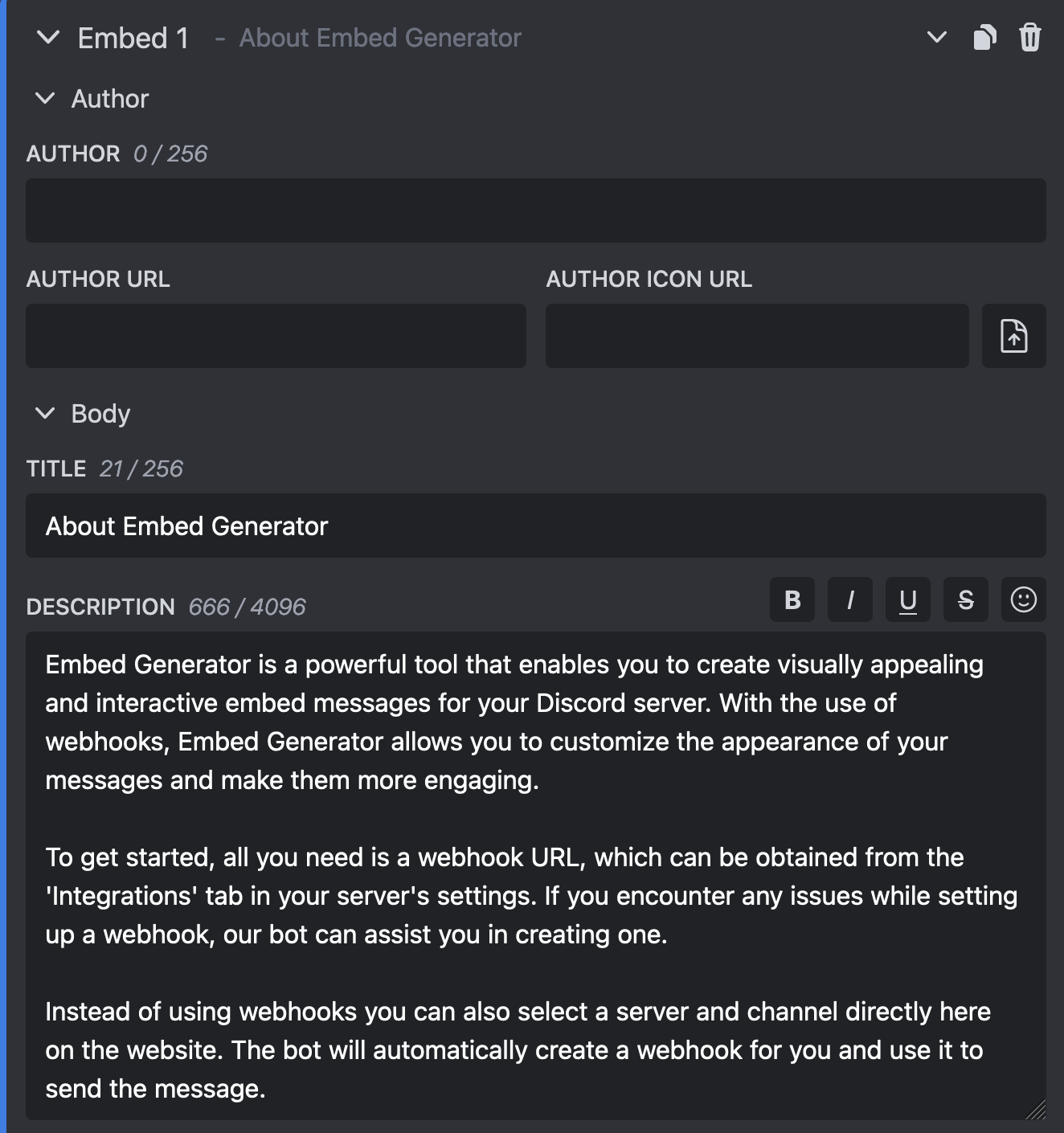
<p>All features are available through a user-friendly web interface. It's all in one place, you never have to leave the site to some other third party service to get all the features.</p>
<p><img decoding="async" loading="lazy" alt="Editor" src="https://message.style/assets/images/editor-5755625b979e8b90ec68716eb0fcb2c3.png" width="1324" height="1410" class="img_ev3q"></p>
<h3 class="anchor anchorWithStickyNavbar_LWe7" id="no-webhook-urls">No Webhook URLs<a href="https://message.style/blog/discohook-alternative#no-webhook-urls" class="hash-link" aria-label="Direct link to No Webhook URLs" title="Direct link to No Webhook URLs">​</a></h3>
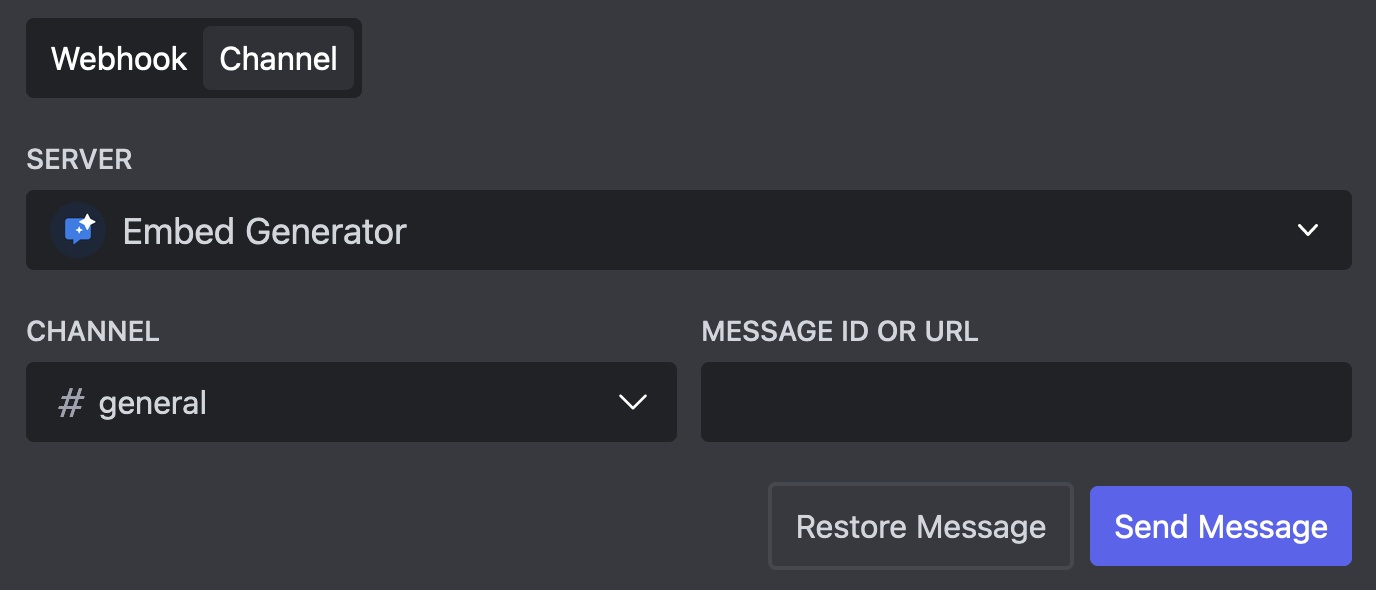
<p>While you can still manually create Webhooks and use the Webhook URL to send the message, with Embed Generator there is an easier way to do it. Simply select the server and channel where you want to send the message and our bot will handle the rest. You can still change the username and avatar!</p>
<p><img decoding="async" loading="lazy" alt="No Webhook Needed" src="https://message.style/assets/images/no-webhook-62a7dcfa86f108a642dea0bfe42705f8.png" width="1376" height="590" class="img_ev3q"></p>
<h3 class="anchor anchorWithStickyNavbar_LWe7" id="real-time-preview">Real-Time Preview<a href="https://message.style/blog/discohook-alternative#real-time-preview" class="hash-link" aria-label="Direct link to Real-Time Preview" title="Direct link to Real-Time Preview">​</a></h3>
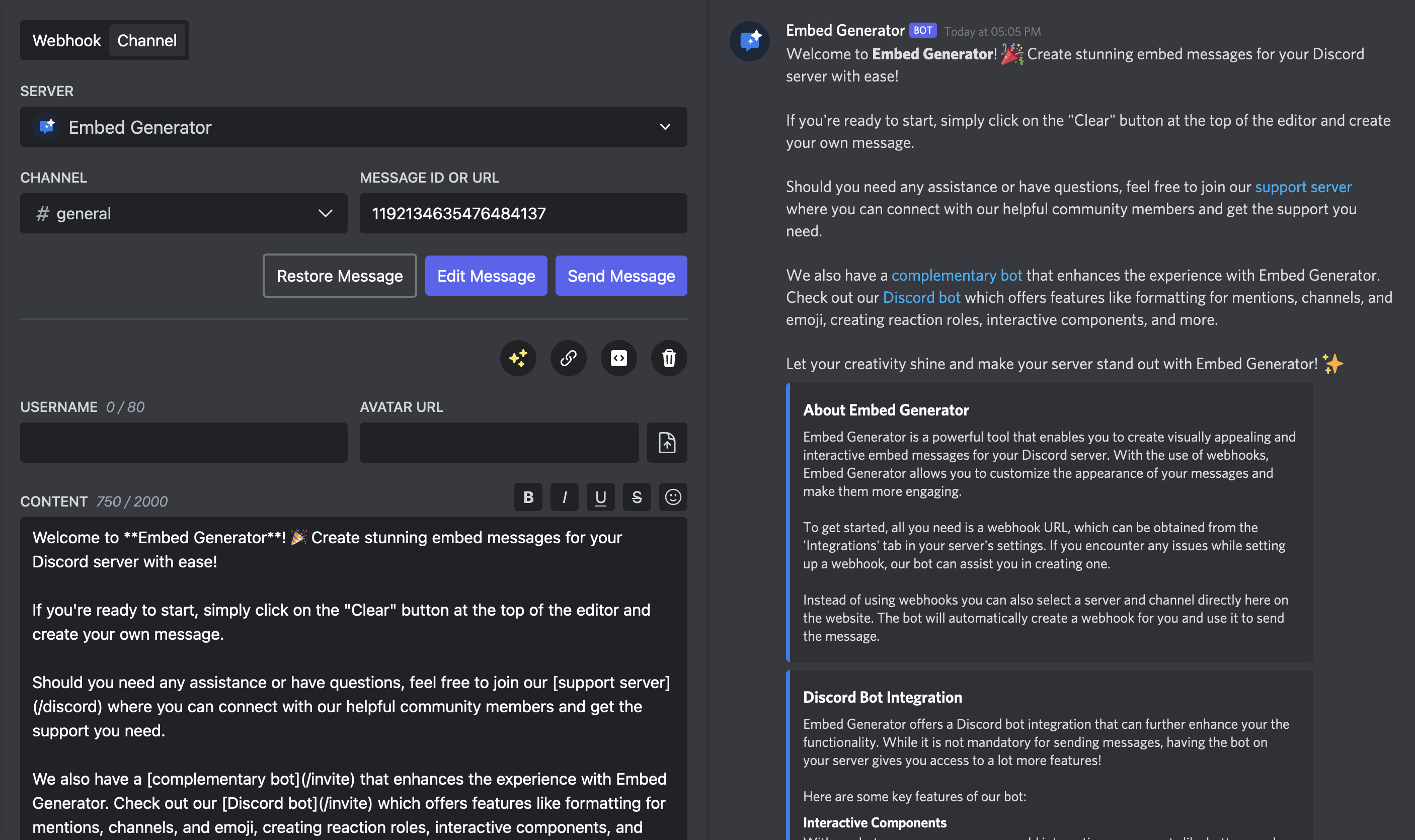
<p>While you are working on your message you don't want to constantly check Discord to see how it will look like in the end. Embed Generator has a live preview built in which matches the Discord UI as close as possible.</p>
<p><img decoding="async" loading="lazy" alt="User Interface" src="https://message.style/assets/images/interface-577f9eece625eed37c06be5488b25a25.png" width="2812" height="1670" class="img_ev3q"></p>
<h3 class="anchor anchorWithStickyNavbar_LWe7" id="interactive-components">Interactive Components<a href="https://message.style/blog/discohook-alternative#interactive-components" class="hash-link" aria-label="Direct link to Interactive Components" title="Direct link to Interactive Components">​</a></h3>
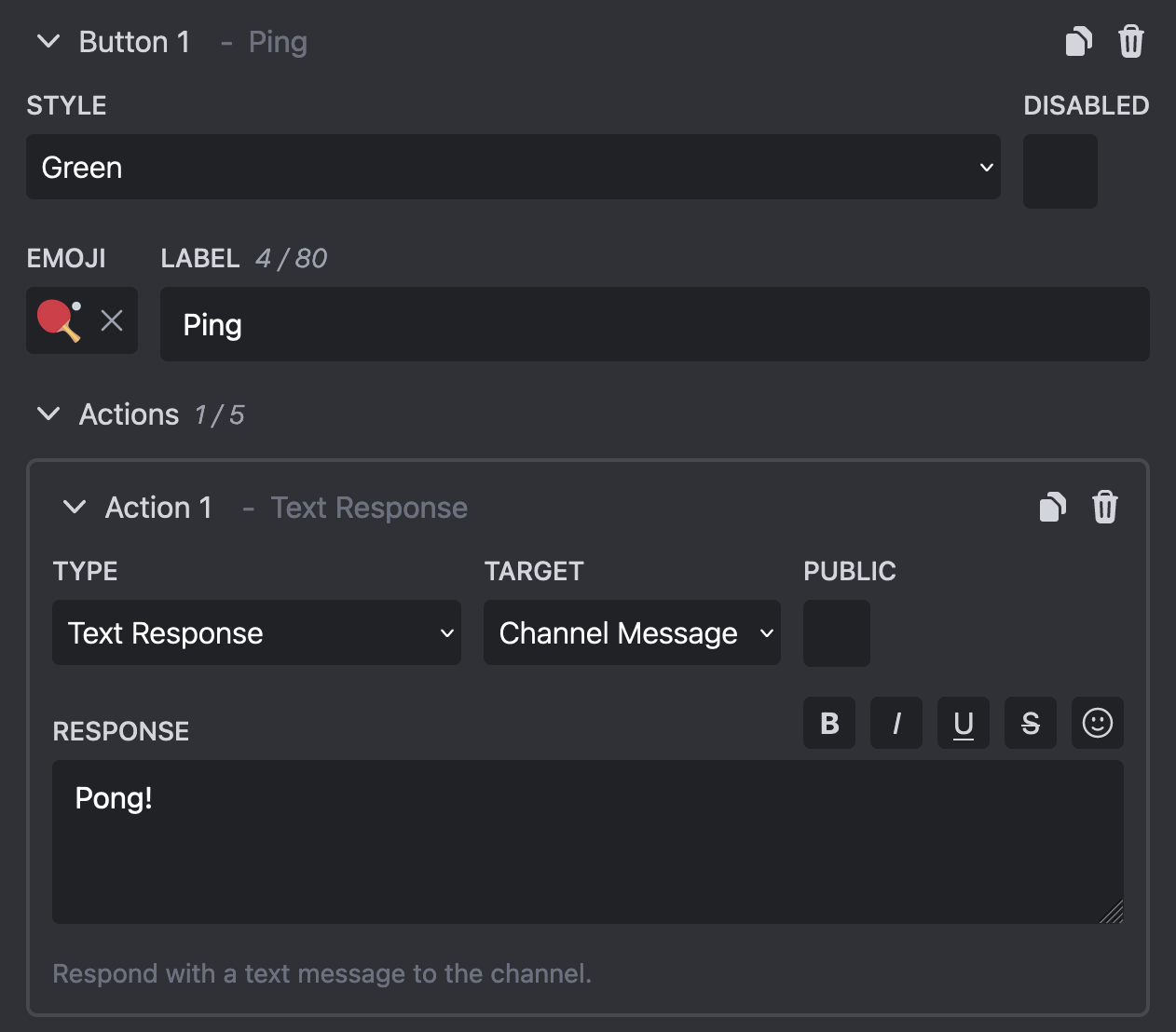
<p>Adding interactive components to your message is easier than ever with Embed Generator! Simply add a button or select menu in the message editor and define what you want to happen when a user interacts with it.</p>
<p><img decoding="async" loading="lazy" alt="Buttons" src="https://message.style/assets/images/buttons-4980b2ae400ce2b5552513836e8ede51.png" width="540" height="94" class="img_ev3q">
<img decoding="async" loading="lazy" alt="Interactive Button" src="https://message.style/assets/images/component-41ec7007af37186d7d1d28fbc388d158.png" width="1262" height="1108" class="img_ev3q"></p>
<h3 class="anchor anchorWithStickyNavbar_LWe7" id="scheduled-messages">Scheduled Messages<a href="https://message.style/blog/discohook-alternative#scheduled-messages" class="hash-link" aria-label="Direct link to Scheduled Messages" title="Direct link to Scheduled Messages">​</a></h3>
<p>You want to send your message at an exact point in time and can't do it yourself? Embed Generator can send your messages at a pre-defined time for you!</p>
<h3 class="anchor anchorWithStickyNavbar_LWe7" id="custom-commands">Custom Commands<a href="https://message.style/blog/discohook-alternative#custom-commands" class="hash-link" aria-label="Direct link to Custom Commands" title="Direct link to Custom Commands">​</a></h3>
<p>Messages aren't enough and you want more ways for users to interact with Embed Generator? Just add your own commands to Embed Generator or even add your own bot with a custom username and avatar!</p>
<h2 class="anchor anchorWithStickyNavbar_LWe7" id="conclusion">Conclusion<a href="https://message.style/blog/discohook-alternative#conclusion" class="hash-link" aria-label="Direct link to Conclusion" title="Direct link to Conclusion">​</a></h2>
<p>Discohook is good solution if you are looking for basic way to create Discord embed messages. As soon as you want more possibilities Discohook becomes increasingly hard to use.</p>
<p>Embed Generator on the hand has everything you need builtin and is easy to use for beginners and also offers all the features for more advanced use cases. Embed Generator's emphasis on rich and dynamic embeds, a user-friendly interface, real-time previews, extensive customization options, and the inclusion of interactive components positions it as a superior alternative to Discohook. As Discord users strive to create engaging and visually stunning environments for their communities, Embed Generator emerges as a powerful tool that unlocks the full potential of embeds, taking Discord integration to new heights.</p>
<p><a href="https://message.style/" target="_blank" rel="noopener noreferrer">Get started with Embed Generator now!</a></p>]]></content>
        <author>
            <name>Merlin</name>
            <uri>https://github.com/merlinfuchs</uri>
        </author>
        <category label="disohook" term="disohook"/>
        <category label="alternative" term="alternative"/>
        <category label="embed" term="embed"/>
        <category label="discord" term="discord"/>
        <category label="webhook" term="webhook"/>
    </entry>
    <entry>
        <title type="html"><![CDATA[Executing Discord Webhooks]]></title>
        <id>https://message.style/blog/executing-webhooks</id>
        <link href="https://message.style/blog/executing-webhooks"/>
        <updated>2024-01-19T00:00:00.000Z</updated>
        <summary type="html"><![CDATA[Discord Webhooks are a powerful feature which allows Discord server administrators to generate a unique URL which can be used by third party services to send messages to a Discord channel.]]></summary>
        <content type="html"><![CDATA[<p>Discord Webhooks are a powerful feature which allows Discord server administrators to generate a unique URL which can be used by third party services to send messages to a Discord channel.</p>
<p>Discord is not the only platform that supports webhooks. They are commonly used by platforms to receive updates and notifications from third party services that integrate with them. These third party services just have to know the webhook URL and the format that is expected to send messages programmatically.</p>
<p>Webhooks on Discord are unique in the sense that they are not only used programmatically by third party services to send updates. Many people use Discord webhooks to send out messages by hand instead of sending them with their own Discord account because webhook messages have way more formatting options than normal messages.</p>
<p>This is why there are tools like <a href="https://message.style/" target="_blank" rel="noopener noreferrer">Embed Generator</a> that can help you sending messages through Discord webhooks.</p>
<h2 class="anchor anchorWithStickyNavbar_LWe7" id="creating-a-webhook">Creating a Webhook<a href="https://message.style/blog/executing-webhooks#creating-a-webhook" class="hash-link" aria-label="Direct link to Creating a Webhook" title="Direct link to Creating a Webhook">​</a></h2>
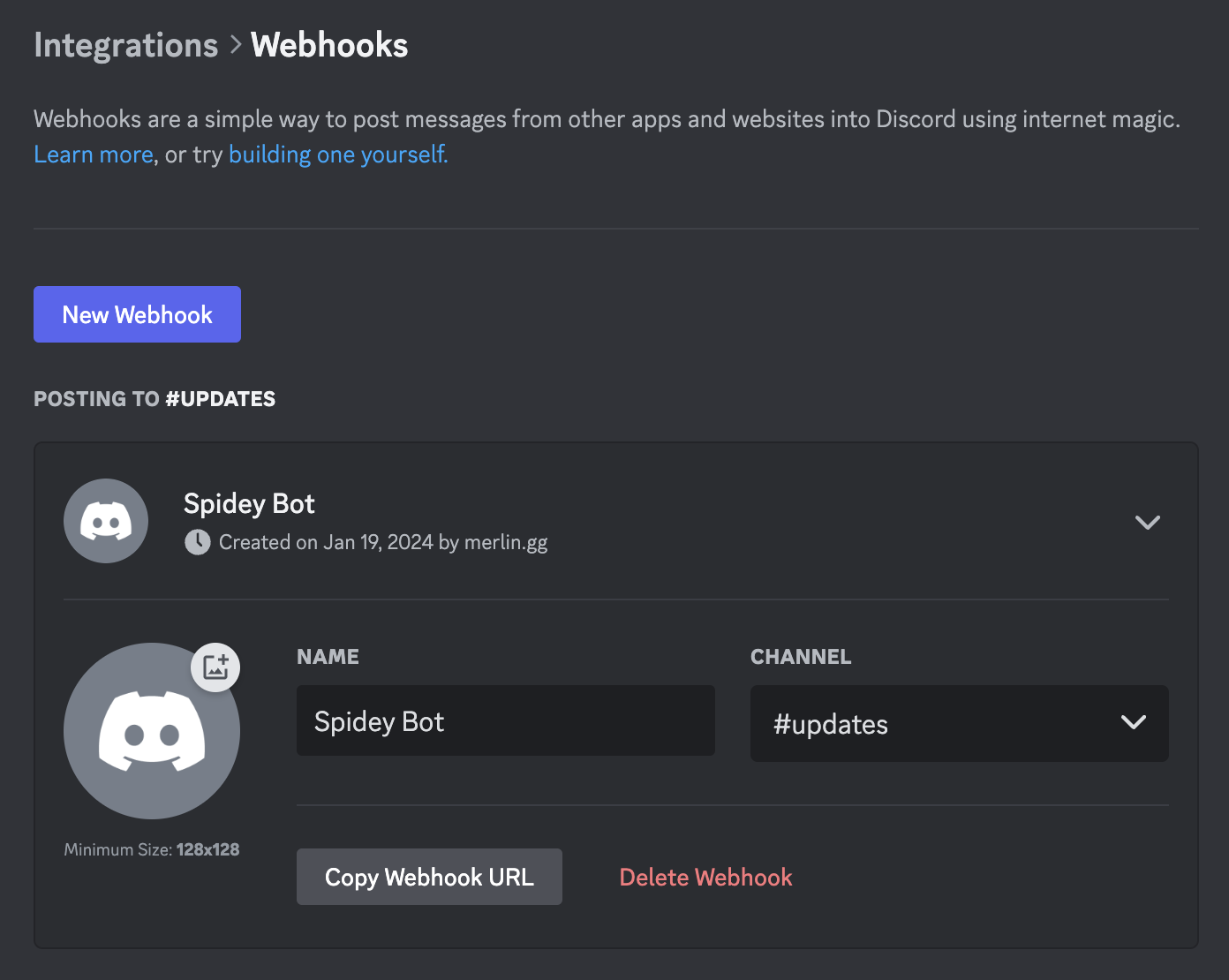
<p>Creating a Webhook is pretty easy as long as you have the "Manage Webhooks" permissions in the channel that you want to create a Webhook for. Just go into the channel settings and select "Integrations" on the left and click on "Create Webhook".<br>
<!-- -->Click on the newly created Webhook to change it's name, set and avatar and copy the webhook URL. <strong>Anyone that has the URL can send a message to the channel</strong>, so keep it secret!</p>
<p><img decoding="async" loading="lazy" alt="Creating a Webhook" src="https://message.style/assets/images/webhooks-b44a2be0afd925dbb4b59f5f520ace32.png" width="1392" height="1110" class="img_ev3q"></p>
<h2 class="anchor anchorWithStickyNavbar_LWe7" id="getting-information-about-webhook">Getting Information about Webhook<a href="https://message.style/blog/executing-webhooks#getting-information-about-webhook" class="hash-link" aria-label="Direct link to Getting Information about Webhook" title="Direct link to Getting Information about Webhook">​</a></h2>
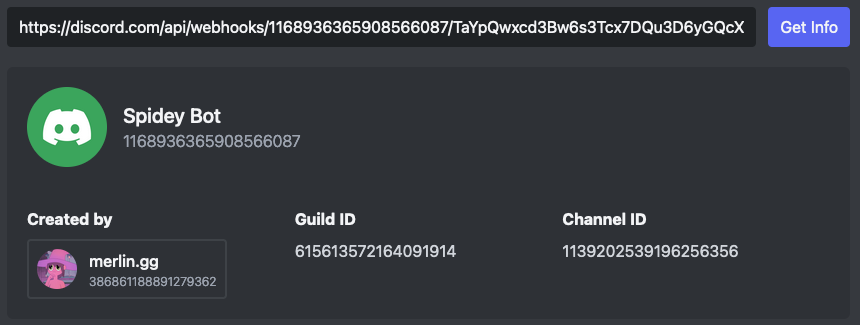
<p>Sometimes you might have the URL for a Webhook but don't actually know where it comes from or which Webhook it belongs to. This is way it can be handy to know how to extract information from a Webhook URL.</p>
<p>To get information about a Webhook you can simply paste its URL into our free <a href="https://message.style/app/tools/webhook-info" target="_blank" rel="noopener noreferrer">Webhook Info tool</a>. It will show you the Webhook name, avatar and who created the Webhook!</p>
<p><img decoding="async" loading="lazy" alt="Webhook Info" src="https://message.style/assets/images/webhook-info-040df83df8c93fcc4f535322382db613.png" width="860" height="325" class="img_ev3q"></p>
<h2 class="anchor anchorWithStickyNavbar_LWe7" id="sending-a-webhok-message">Sending a Webhok Message<a href="https://message.style/blog/executing-webhooks#sending-a-webhok-message" class="hash-link" aria-label="Direct link to Sending a Webhok Message" title="Direct link to Sending a Webhok Message">​</a></h2>
<p>Now the interesting part, how do we actually send a message with a Webhook?<br>
<!-- -->Usually sending a Webhook message requires programming skills or at least some technology knowledge. Luckily there are tools like <a href="https://message.style/" target="_blank" rel="noopener noreferrer">Embed Generator</a> that make it trivial to send a Webhook message without programming skills!</p>
<h3 class="anchor anchorWithStickyNavbar_LWe7" id="paste-in-the-webhook-url">Paste in the Webhook URL<a href="https://message.style/blog/executing-webhooks#paste-in-the-webhook-url" class="hash-link" aria-label="Direct link to Paste in the Webhook URL" title="Direct link to Paste in the Webhook URL">​</a></h3>
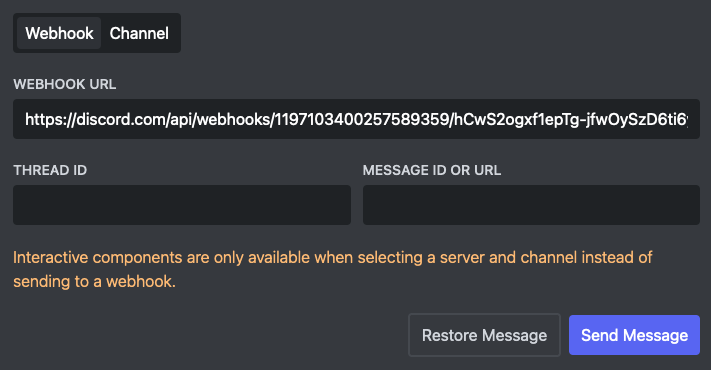
<p>Open the <a href="https://message.style/app" target="_blank" rel="noopener noreferrer">message editor of Embed Generator</a> and click on "Webhook" at the top to indicate that you want to send the message to a Webhook.</p>
<p>Now paste in the Webhook URL that you got after the creating the Webhook into the "Webhook URL" field.</p>
<p><img decoding="async" loading="lazy" alt="Embed Generator Webhook" src="https://message.style/assets/images/editor-send-89a88c26687d87fe41754da5b4771619.png" width="711" height="370" class="img_ev3q"></p>
<h3 class="anchor anchorWithStickyNavbar_LWe7" id="create-your-message">Create Your Message<a href="https://message.style/blog/executing-webhooks#create-your-message" class="hash-link" aria-label="Direct link to Create Your Message" title="Direct link to Create Your Message">​</a></h3>
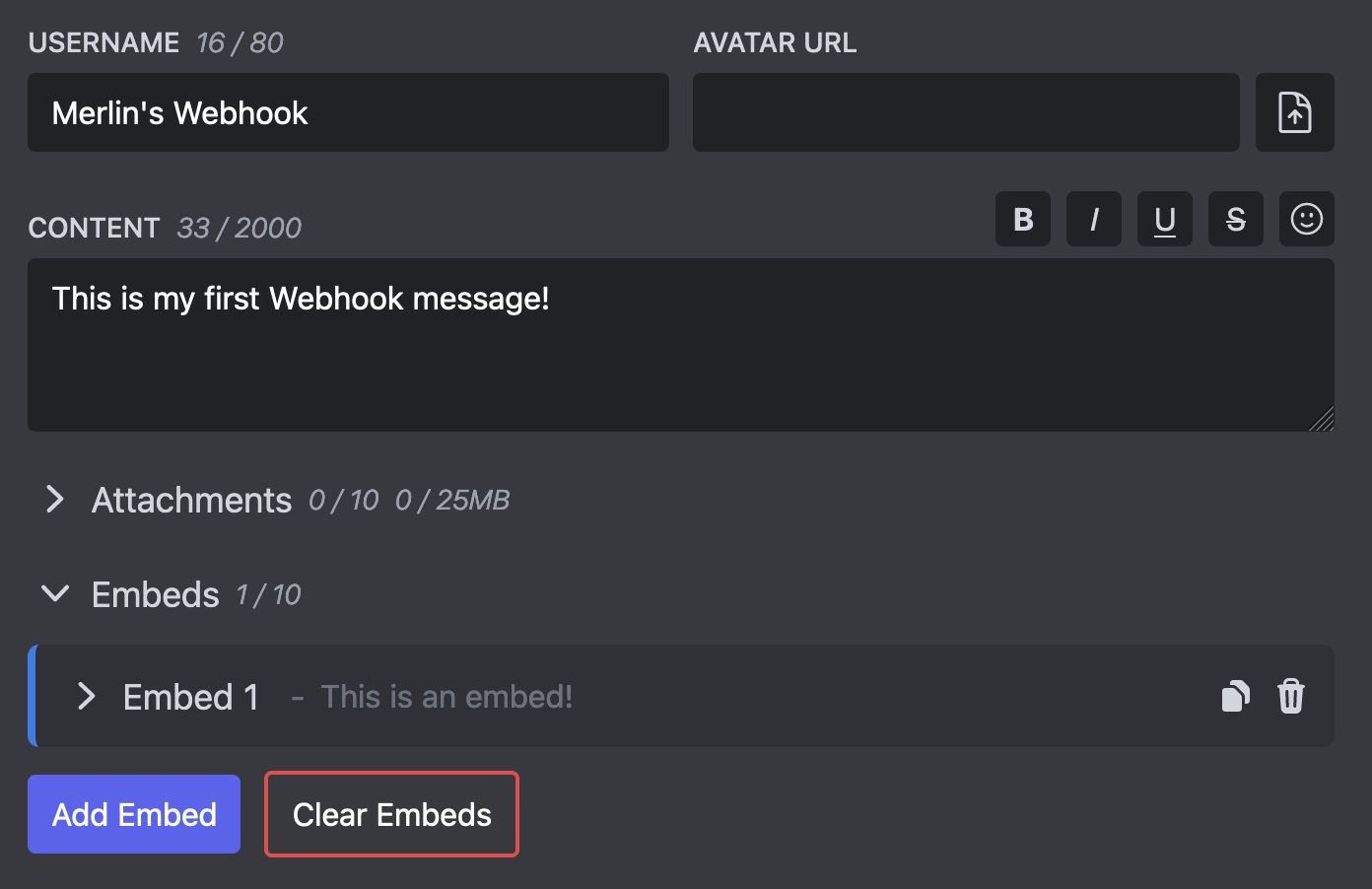
<p>Now you can start creating your message. Embed Generator gives you a lot of options to style your message.</p>
<p>First you can set the username and avatar which you can use to override the avatar and name you gave to the Webhook. For every message you send you can set a custom username and avatar!</p>
<p>Now you can add some text to your message by filling out the Content field. Embed Generator provides you with some a useful toolbar to format your message and add emojis to it.</p>
<p>Lastly you can also add embeds to your message. These are like separate content blocks that support more styling options like adding a title, custom fields, and images.</p>
<p><img decoding="async" loading="lazy" alt="Embed Generator Editor" src="https://message.style/assets/images/editor-message-1d1067474f1d16e36e2367dcef374f3d.png" width="1392" height="902" class="img_ev3q"></p>
<h3 class="anchor anchorWithStickyNavbar_LWe7" id="send-your-message">Send Your Message<a href="https://message.style/blog/executing-webhooks#send-your-message" class="hash-link" aria-label="Direct link to Send Your Message" title="Direct link to Send Your Message">​</a></h3>
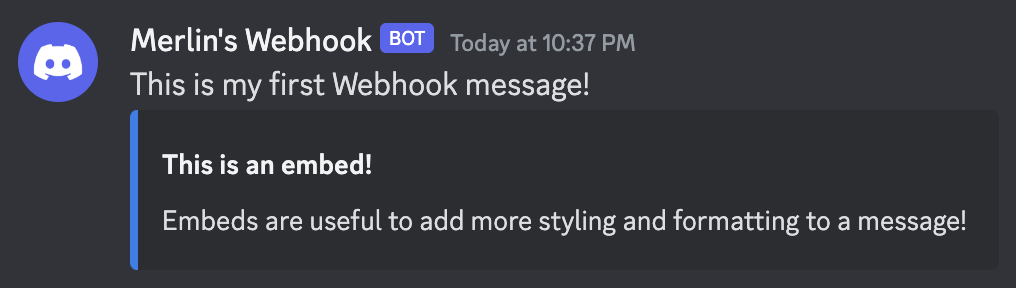
<p>Once you are happy with your message you can send the message to your Webhook my clicking on "Send Message" at the top of the page.</p>
<p>This is it! You have created your first Webhook message!</p>
<p><img decoding="async" loading="lazy" alt="Example Message" src="https://message.style/assets/images/message-7ee6cb5453451d381dc250ef541d5cfd.png" width="1016" height="288" class="img_ev3q"></p>]]></content>
        <author>
            <name>Merlin</name>
            <uri>https://github.com/merlinfuchs</uri>
        </author>
        <category label="discord" term="discord"/>
        <category label="webhook" term="webhook"/>
        <category label="embed" term="embed"/>
        <category label="api" term="api"/>
    </entry>
</feed>